

Quick summary
In this guide, we reviewed 10 continuous improvement tools, including Hups, KaiNexus, LeanSuite, Rever, Solvace and Hives. We compared what each tool covers, who it fits and how it is priced.
Disclosure: Hups makes continuous improvement software, and we rank our own product first. To keep the comparison fair, we list our own cons, use vendor and review-site data for every tool, and say when a simpler tool is enough.
Here are our top three picks:
| Tool | Best for |
|---|---|
| Hups | Organizations that want to run improvement work themselves across sites and functions, with training, daily management, flow mapping and improvement in one system |
| KaiNexus | Spreading employee-driven improvement and tracking its impact across departments |
| LeanSuite | Manufacturing plants that want ideas, kaizen, SOPs and training per facility, with unlimited users |
Hups ranks first because it connects learning, daily follow-up and end-to-end flow work in one system. Most tools on this list do one of these parts well. If you only need one part, a specialist tool may fit better, and we say which.
Looking for the best continuous improvement software?
Continuous improvement software is a digital system that helps teams capture problems and ideas, solve them in a structured way, follow up on actions and measure results. Typical features include:
- Idea and problem capture, often from a mobile phone
- Improvement boards and kaizen or A3 templates
- Daily management boards with team KPIs
- Action tracking with owners and due dates
- Reports on impact, such as savings, lead time or quality
Why improvement work stalls without a system
Most organizations already know what they want to improve. The problem is the follow-up.
This autumn we held demo calls with eight Nordic and European manufacturers. Six of the eight described the same pattern. They ran a workshop, a training or an assessment, and agreed on actions. Then daily work came back and the actions faded. One director of continuous improvement put it this way: "all of the excitement just faded."
Six of the eight also said their improvement work was spread across too many places: whiteboards, Excel, Word files and several separate systems. Nobody had an overview.
Good continuous improvement software closes this gap. It makes ownership visible, keeps a weekly rhythm and gives feedback to the person who raised the issue.
What continuous improvement software does for you
- Keeps actions alive after the workshop, with owners, due dates and reminders
- Gives every team the same method, so improvement does not depend on one expert
- Makes results visible to leaders without extra reporting
- Connects improvement work across sites, shifts and functions
- Builds a record of what worked, so the next team does not start from zero
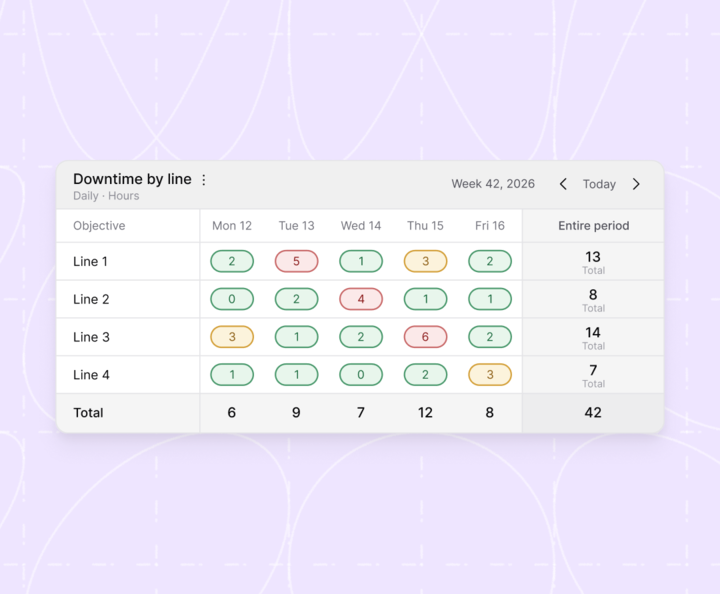
Example: a team board that tracks downtime for four production lines over one week. The totals show which line and which day need attention first.
Other names for this category
Buyers also search for kaizen software, lean software, idea management software and operational excellence software. These categories overlap. A broader version of the category is sometimes called a transformation management system.
Continuous improvement software is different from:
- Project management tools such as monday.com, Asana or Planner. They track tasks but have no improvement method or team KPIs.
- Learning management systems (LMS). They deliver courses but do not connect learning to daily work.
- BI tools such as Power BI. They show data but do not drive the conversation about what to do next.
When you do not need dedicated software
If you have one site, one team and a working whiteboard routine, you may not need a new system. Excel and a weekly meeting can work well at that scale. Software starts to pay off when you need several teams, sites or functions to work the same way, or when follow-up keeps breaking down.
Why trust us?
We built Hups because we saw the same pattern again and again. Organizations invest in an improvement program, get early results, and then lose them when the external experts leave. Our platform helps organizations run improvement work themselves instead of buying it in every cycle.
Organizations working with Hups have reduced lead time by up to 80% and improved productivity by 30%. One customer generated over 200 improvements in the first phase of their program. One management team implemented 196 improvements in six weeks.
What some of our customers say:
"Hups programs inspire ideas for improvement from day one. We have generated over 200 improvements so far and we're well equipped to continue."
Tove Parot, HR Director, Cloetta
"Our flow analyses have created a shared view and incredible engagement. Leadership has fully adopted the Hups approach, building momentum across the organization. I've never seen anything like it in my ten years in this industry."
Gustaf Landén, Project Leader, LKAB
"I was impressed with the simplicity of the Hups program and the connection with our reality. It is the best explanation about flow I have seen!"
Leandro Quinteiro, VPS Quality Director, Volvo Group
For this comparison, we used each vendor's website, public review sites (G2 and Capterra) and our own conversations with buyers who evaluated these tools in 2026. We also know Hups is not the right fit for everyone, so we describe where other tools are stronger.
Now, onto the list.
10 best continuous improvement software overview
| Tool | Best for | Key features | Compliance | Pricing |
|---|---|---|---|---|
| 1. Hups Sweden |
Internal improvement work across sites and functions | Training library, team assessments, daily management boards, flow mapping, improvement boards | ISO 27001:2022 certified GDPR |
Custom quote |
| 2. KaiNexus USA |
Employee-driven improvement across departments | Idea capture, improvement boards, impact reporting, recognition | SOC 2 Type II | Custom quote |
| 3. LeanSuite Canada |
Plant-level lean operating system | Ideas, kaizen, issues, SOPs, LMS, KPI dashboards | Not stated | Per facility, unlimited users Free plan up to 25 users |
| 4. Rever USA |
Frontline kaizen and idea capture | Mobile idea capture, root cause analysis, savings tracking | ISO 27001:2022 GDPR aligned |
From $5 per user per month (Capterra) |
| 5. Solvace France |
Digitizing shop floor routines | 25+ lean, TPM and WCM apps, skills matrix | ISO 27001 | Custom quote |
| 6. Tervene Canada |
Frontline managers in industrial sites | Leader standard work, gemba walks, tiered meetings | ISO 27001 SOC 2 Type II |
Custom quote |
| 7. Hives Sweden, Netherlands |
Collecting and acting on employee ideas | Idea collections, custom workflows, AI assistant | EU-hosted GDPR |
From €695 per month |
| 8. iObeya France |
Lean and agile visual management | Virtual obeya rooms, visual boards, Jira integration | ISO 27001 GDPR |
No public pricing |
| 9. Minitab Engage USA |
Lean Six Sigma project portfolios | Project templates, idea management, impact dashboards | ISO 27001:2022 GDPR aligned |
Custom quote |
| 10. Redzone USA |
Food, beverage and CPG plants | Live production metrics, huddles, coaching | SOC 2 Type II GDPR |
Custom quote |
Disclaimer: We checked compliance claims on each vendor's own website in October 2026. ISO 27001 is the international certification for information security. GDPR is the EU law on personal data. "Not stated" means we could not find a public claim. It does not mean the vendor is non-compliant.
Let's now take a closer look at each tool.
1. Hups
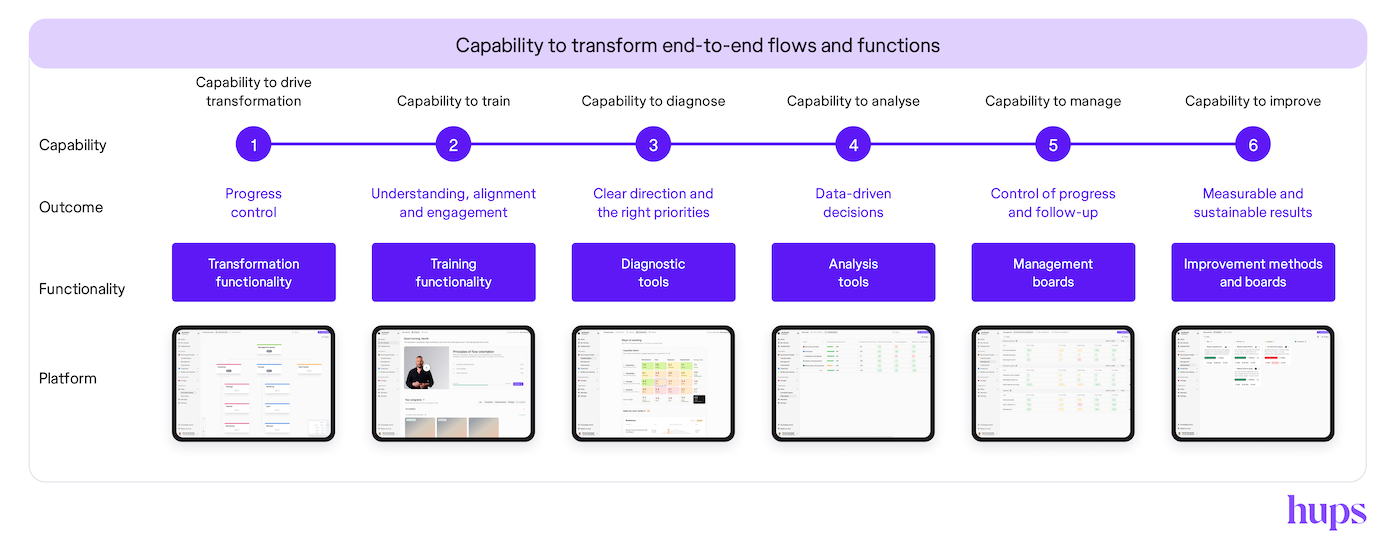
Hups is a transformation management system for organizations that want to run improvement work themselves. It combines training, team assessments, daily management, flow mapping and improvement boards in one platform. Teams learn a method, apply it to their own work the same week and follow up in their daily meeting.
Hups is built around flow. It covers the shop floor, but its main focus is how work moves through the whole organization, including order handling, engineering changes, HR and other support functions.
Key features
- Training library: Lean, flow and problem-solving modules, linked to the team's own improvement work.
- Team assessments: Show where a team stands and track progress over time.
- Daily management boards: Team KPIs and action follow-up in the same short meeting.
- Flow mapping and flow efficiency analysis: Make waiting and handovers between functions visible.
- Improvement boards: Structured problem solving, with an owner and activities for each initiative.
- Governance: Gives leaders one view across sites and business units.
- Mobile login: Operators can log in with a mobile number, without a company email.
Pricing
Custom quote after a demo. Hups does not price per user, so you can include everyone without the cost rising per person. Book a demo to get a quote.
Pros
- One system for learning, daily follow-up and improvement, so teams do not switch between tools.
- Builds internal capability and reduces dependence on consultants.
- Works beyond the shop floor, in office and support flows.
- Multi-site and multilingual.
- ISO 27001:2022 certified, with data hosted in the EU.
Cons
- Needs internal trainers or super users to drive adoption.
- Teams enter their 4 to 5 key KPIs by hand today, which some large companies cannot accept. An API is planned for early 2027.
- More than a single site with one team needs.
- No public pricing.
- Cloud only, with no on-premise version.
Results
Organizations working with Hups have reduced lead time by up to 80% and improved productivity by 30%. One customer generated over 200 improvements in the first phase of their program. One management team implemented 196 improvements in six weeks.
2. KaiNexus
KaiNexus is one of the best-known continuous improvement platforms. It helps organizations capture improvement ideas from employees, manage them through a workflow and report on their impact. It is widely used in healthcare and manufacturing.
Key features
- Idea capture: Collects improvement ideas from staff and routes them through structured workflows.
- Improvement boards: Organizes improvements on boards with detailed tracking.
- Impact reporting: Shows participation and the measured impact of improvements, including financial results.
- Recognition: Lets colleagues give each other public recognition for improvement work.
Pricing
Custom pricing, based on user levels, add-ons and services.
Pros
- Purpose-built for continuous improvement.
- Reviewers praise customer support.
- Flexible enough for complex organizations.
Cons
- Setup takes effort, and reviewers say configuration can be complex.
- No built-in training library or end-to-end flow mapping.
- One reviewer asked for pricing suited to small hospitals.
3. LeanSuite
LeanSuite, based in Canada, markets itself as a lean operating system for manufacturing plants. It connects issues, ideas, kaizen projects, SOPs, training and KPI dashboards. Its pricing model stands out: you pay per facility, with unlimited users.
Key features
- Issue and idea management: Captures daily issues and improvement ideas.
- Kaizen and projects: Tracks kaizen events and improvement projects.
- SOPs and documents: Keeps approved standard work available on the floor.
- Training and competency: Includes a learning management system and competency tracking.
- KPI dashboards: Links improvement work to plant KPIs and tracks the CI portfolio.
Pricing
Custom quote per facility, including all modules and unlimited users. A free Starter plan covers teams of 25 or fewer. LeanSuite also offers a 90-day pilot for $3,000 per facility.
Pros
- Unlimited users per facility.
- Reviewers praise support and ease of use for standard kaizens.
- Free plan for small teams.
Cons
- Built for manufacturing plants rather than office or end-to-end flows.
- Reviewers report recurring bugs and limited custom analytics.
- Small review base: 9 reviews on Capterra, rated 4.4 out of 5.
- Reviewers mention limited training materials for the platform itself.
4. Rever
Rever makes it easy for frontline workers to share ideas and solve problems from their phones. It suits organizations that want more people involved in kaizen quickly.
Key features
- Mobile capture: Frontline workers submit ideas and problems from their phones.
- Root cause analysis: Guides teams through structured problem solving.
- Savings tracking: Records the measured impact of each improvement.
- Engagement tools: Recognition and feedback to keep people involved.
Pricing
Capterra lists a starting price of $5 per user per month, with a free trial. G2 lists pricing on request.
Pros
- Very easy idea submission.
- Reviewers report more ideas and measurable savings.
- Low entry price.
Cons
- Limited support for strategy deployment, flow mapping and portfolio-level ROI.
- Many reviews are several years old.
5. Solvace
Solvace offers a broad set of apps for lean, TPM (total productive maintenance) and world class manufacturing. It is built for plants that want to digitize their shop floor routines.
Key features
- App library: More than 25 apps for lean, TPM and WCM.
- Shop floor routines: Digital routines and improvement apps for the plant.
- Skills matrix: Tracks who can do what.
- Digital obeya: A digital room for visual management.
Pricing
Custom quote.
Pros
- Broad coverage of manufacturing methods.
- Built with shop floor experience.
- Multilingual mobile access.
Cons
- Focused on manufacturing, with limited support for service and office flows.
- Few public reviews.
6. Tervene
Tervene helps frontline managers in industrial sites run their daily routines. Its strength is leader standard work: the fixed routines a manager follows each day and week.
Key features
- Daily management and tiered meetings: Structures meetings from team level to site level.
- Leader standard work: Defines and tracks the routines each manager follows.
- Gemba walks: Plans and records visits to where the work happens.
- QHSE routines: Supports quality, health, safety and environment checks.
Pricing
Custom quote. Book a demo.
Pros
- Strong support for leader standard work.
- Clear escalation of problems between tiers.
Cons
- Focused on industrial sites.
- No training library or end-to-end flow analysis.
7. Hives
Hives is a platform for collecting, organizing and acting on ideas and feedback. It has a dedicated offer for continuous improvement and lean teams. It is one of the few tools in this category with public prices.
Key features
- Idea collections: Gathers ideas and feedback in themed collections.
- Custom workflows: Routes each idea through your own review steps.
- AI assistant: Helps sort and summarize ideas.
- Integrations: Works with Microsoft Teams and Google Workspace, with SSO on all plans.
Pricing
Billed annually. Core starts at €695 per month, Pro at €1,495 per month and Enterprise at €1,995 per month. Plans are based on the number of managers and contributors, not on users.
Pros
- Public, predictable pricing.
- EU-hosted and GDPR-focused.
- Works for ideas from any part of the organization, not only the shop floor.
Cons
- Focused on ideas and feedback rather than daily management or flow.
- Its pricing page lists no training library, team KPIs or flow mapping.
- Multiple hives are only available on the Enterprise plan.
8. iObeya
iObeya brings physical visual management boards into a digital space. Large organizations use it to run obeya rooms and visual boards across sites, often combining lean and agile ways of working.
Key features
- Virtual obeya rooms: Digital versions of physical war rooms.
- Visual boards: Boards for daily management and problem solving.
- Integrations: Connects with Jira, Slack and ServiceNow.
Pricing
No public pricing. A free trial is available. SelectHub reports prices from $3,780 per year.
Pros
- Strong digital version of physical visual management.
- Reviewers describe smooth implementation.
Cons
- Can feel rigid.
- Training and assessments are not part of the core product.
- Reviewers report an average implementation time of three months.
9. Minitab Engage
Minitab Engage manages Lean Six Sigma projects and idea pipelines. It suits organizations where improvement is led by trained specialists, such as Green Belts and Black Belts.
Key features
- Idea management: Collects and prioritizes project ideas.
- Project templates: Standard Lean Six Sigma templates for consistent projects.
- Visual tools: Process maps and other analysis tools.
- Impact dashboards: Tracks savings and project results across the portfolio.
Pricing
Custom quote. No public pricing.
Pros
- Good fit for organizations already using Minitab.
- Consistent project templates.
Cons
- Built for project specialists rather than every team.
- Limited support for daily team routines.
- No training library for all employees.
10. Redzone
Redzone, now part of QAD, connects frontline teams in manufacturing plants to live production data. It is most widely used in food, beverage and consumer goods.
Key features
- Live production metrics: Shows performance on the shop floor as it happens.
- Huddles: Supports team meetings and communication.
- Quality and maintenance modules: Covers related plant routines.
- Coaching: Supports the rollout with coaching.
Pricing
Custom quote. Reviewers report a two-month implementation and return on investment within nine months.
Pros
- Easy to use.
- Live metrics on the shop floor.
- Large base of G2 reviews.
Cons
- Mainly built for food, beverage and consumer goods.
- Some reviewers report setup and reporting challenges.
Choose the best continuous improvement software for your organization
Most tools on this list do one part of continuous improvement well. KaiNexus, Rever and Hives capture ideas. Tervene and Redzone run daily routines on the shop floor. Minitab Engage manages specialist projects. LeanSuite and Solvace digitize plant routines.
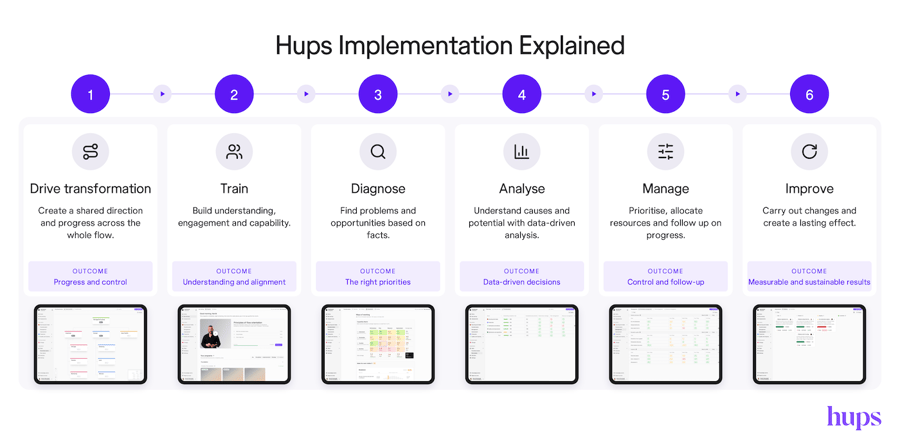
Before you choose, decide whether you want to connect these parts yourself or use one system. If your improvement programs have faded before, the missing piece is usually not another tool. It is the link between what people learn, what they follow up on each week and how the end-to-end flow performs.
Use these seven questions when you compare tools:
- Follow-up after the workshop. Does the tool make owners, due dates and weekly follow-up visible? This is where most programs fail.
- Reach to every employee. Can operators without email log in? Does the price rise with each user you add?
- Learning linked to daily work. Do people learn a method and use it on their own work in the same week?
- End-to-end flow. Does the tool cover office and support functions, or only the shop floor?
- Fit with the tools you already have. Can it live next to your ERP, maintenance system and deviation reporting? Ask about integrations and data entry.
- Internal capability. Does it help your own people lead improvement, or does it depend on external experts?
- Scale and security. Does it work across sites, languages and shifts? Does it meet ISO 27001 and GDPR?
Hups is strong on questions 1 to 4, 6 and 7. On question 5, teams enter their key KPIs by hand today. If automatic data feeds from your ERP or machines are a must right now, look closely at how each vendor handles them.

FAQs
What is continuous improvement software?
Continuous improvement software is a digital system for capturing problems and ideas, solving them with a structured method, following up on actions and measuring results. It replaces scattered whiteboards, spreadsheets and email threads with one shared view of improvement work.
Who uses continuous improvement software?
CI managers, operational excellence leads, team leaders and frontline employees use it day to day. Senior leaders use it to see progress across sites and functions. It is most common in manufacturing, and it is also used in logistics, healthcare, finance and the public sector.
What is the difference between continuous improvement software and project management tools?
Project management tools such as monday.com or Asana track tasks and deadlines. Continuous improvement software adds an improvement method (such as PDCA or A3), team KPIs and a daily or weekly follow-up rhythm. If you only need to track a few improvement projects, a project management tool may be enough.
Does continuous improvement software only apply to manufacturing?
No. Many tools are built for the shop floor, but the same principles apply to order handling, quoting, HR, finance and other support functions. In many companies, the longest lead times are in these office flows.
How much does continuous improvement software cost?
Prices vary a lot. Some tools charge per user, from about $5 per user per month. Others charge per facility or per company. Public prices we found range from €695 per month for an idea management platform to custom enterprise contracts. Ask whether the price grows with each user, because that can limit how many people you include.
How long does it take to see results?
Teams usually see their first completed improvements within weeks. Lasting change in lead time or productivity usually takes several months, because new routines need time to stick. Implementation time ranges from a few weeks to about three months, depending on the tool and the number of sites.
How do you know if continuous improvement software is working?
Track whether people use it and whether results improve. Useful measures include the share of actions closed on time, the number of completed improvements per team, and changes in lead time, quality or productivity. If actions stay open and meetings stop, the tool is not working, whatever the license says.
Run improvement work yourself
Your teams often know what to improve. Hups helps them keep doing it, with training, daily follow-up and flow work in one place.