

Counting is not improvement work. It is preparation for it. If a team spends the first part of a meeting adding up results, less time is left to talk about what the numbers mean and what to do next. Now the board does the counting, so the team can start with the conversation.
Totals for each objective and each measurement
Totals now appear in two places:
Totals for each objective and each measurement
Totals now appear in two places:
- For each objective — the result over the whole period.
- For each measurement — the result across all objectives. This one appears when every objective on the board uses the same value type and unit.
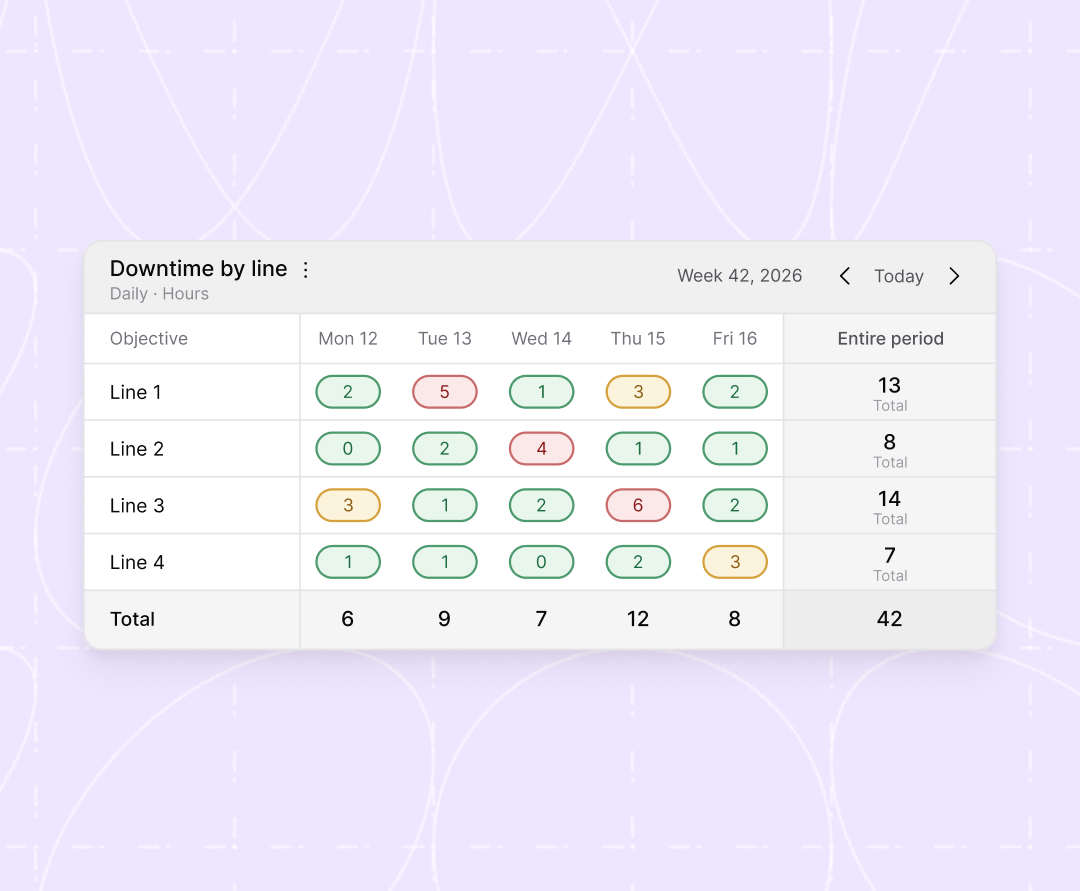
In this example, the board tracks downtime in hours for four production lines over one week. The objective totals show that Line 3 had the most downtime: 14 hours. The daily totals show that Thursday was the worst day, with 12 hours across all lines. The whole week adds up to 42 hours.
The objective total answers the question “How did we do on this over the period?” The measurement total answers “How did this day go overall?” Both questions come up in almost every follow-up meeting. Now the answer is already on the board.
Total, average or latest value: you choose per objective
Not every number should be added up. If you add up a daily customer satisfaction score over a month, the result means nothing. That is why you choose how each objective is calculated.
|
Setting |
What the board shows |
Example objective |
|---|---|---|
|
Total |
The sum of all values |
Number of orders delivered |
|
Average |
The mean of all values |
Customer satisfaction score |
|
Latest value |
The most recent value |
Number of open cases in the backlog |
The right choice depends on what the objective measures. Ask yourself: “What number would I want to see if I looked at this objective for the first time today?”
How to set it up
Totals are already there on boards with numeric objectives. To change how an objective is calculated, open Edit board in the board menu and choose total, average or latest value for that objective.
Spend the meeting on improvement, not on counting
A board is useful when it helps a team see what is happening and decide what to do. Totals make the overall picture visible at a glance. The team can then spend its time on the questions that lead to improvement: Why did this objective drop last week? What got in the way? What do we try next?
Next time your team meets at the board, look at the totals first. What do they tell you that the daily numbers did not?

 Carl Wadmark