

Your organisation and your teams now share one sidebar in Hups. Everything you used before is still there, and it is easier to reach. You can move between any team and the organisation without switching views.
This post explains what we changed, why we changed it, and how to find your way in the new sidebar.
Why did the old navigation slow you down?
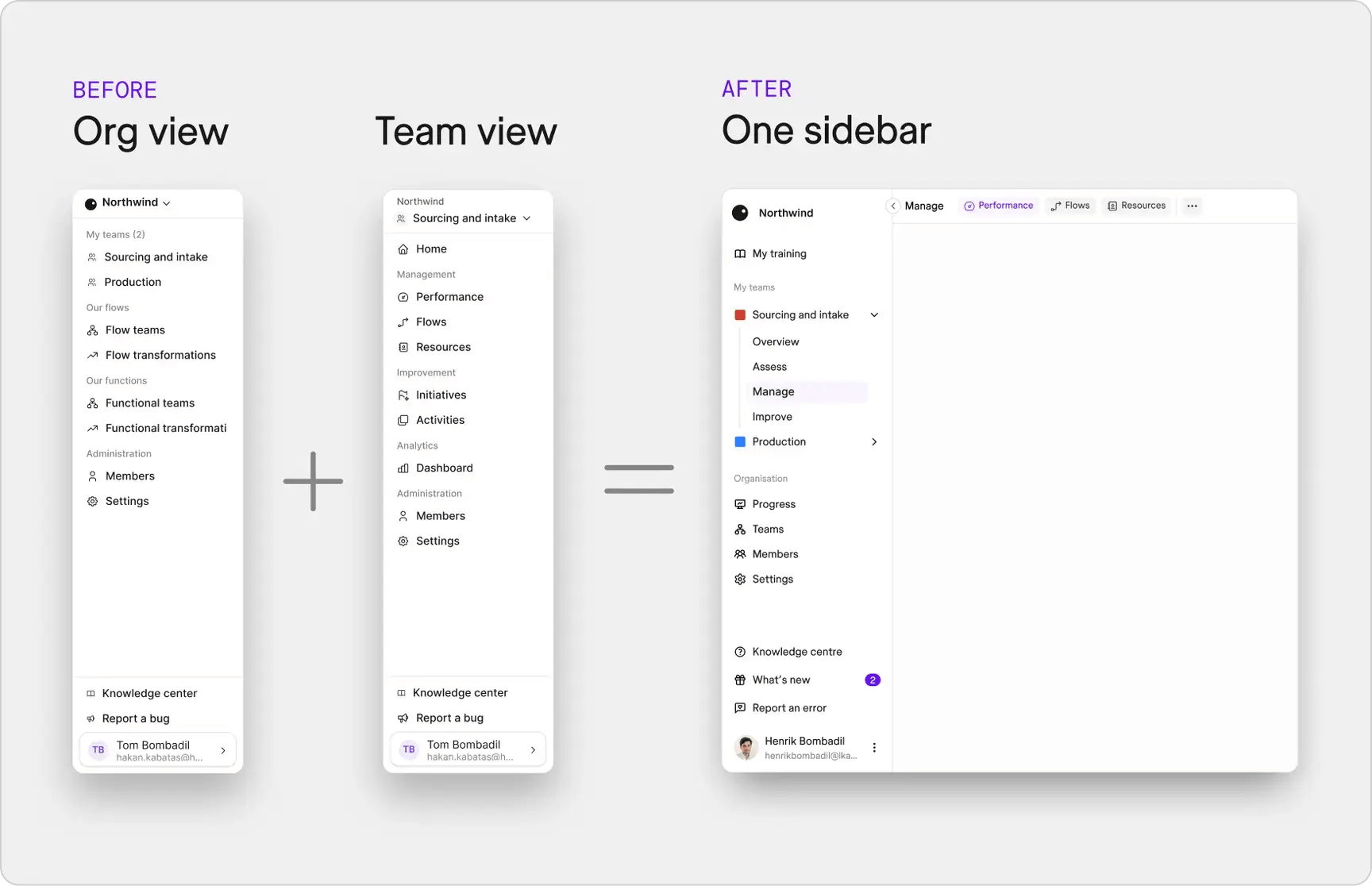
Before this update, Hups had two separate menus: one for the organisation and one for each team. When you opened a team, the team menu replaced the organisation menu.
That sounds like a small detail. In practice, it meant extra steps for common tasks. Say you lead the Sourcing and intake team. You check your team's performance, then want to see how the whole organisation is progressing. You had to leave the team view, go back to the organisation view, and find your way again. If you belong to more than one team, you repeated this every time you moved between them.
Each switch only takes a few seconds. The real cost is that you lose your place and have to rebuild the picture in your head.
What changed in the sidebar?
The organisation menu and the team menu are now one sidebar. Your teams and the organisation pages sit next to each other, so you can reach both from any page.
Here is how to find your way:
- Your teams. Find them under "My teams". Expand a team to see its sections: Overview, Assess, Manage and Improve.
- Views as tabs. Open a section and its views appear as tabs across the top of the page. For example, Manage has Performance, Flows and Resources.
- Organisation pages. Find Progress, Teams, Members and Settings under "Organisation" in the sidebar.
Nothing was removed. If you used a page before, it is still there.
Why does a sidebar matter for flow?
We spend much of our time helping organisations find what slows their flow. Flow is how smoothly work moves from start to finish. The causes are often small and easy to miss: a handoff between teams, a wait for approval, or a switch from one task to another.
One switch rarely looks like a problem. The cost shows up when the same small switch happens many times a day, for many people.
Our old navigation had this kind of hidden switch built in. Team work and organisation work lived in separate places, even though leaders need both at the same time. A team leader needs to see how the team's improvements connect to the organisation's progress. A transformation lead needs to move between teams to compare and support them.
So we applied the same thinking we use with our customers. We found a step in our own product that added no value, and we removed it.
What can you do from the new sidebar?
The sidebar now follows the way a team works with improvement: understand the current state, manage the daily work, and improve it. Each part connects to a part of the Hups platform.
- Assess. Diagnose your current state with a shared view across the whole function and the whole flow. Then focus on the improvements with the biggest impact.
- Manage. Use management boards to track performance, resources and flows. Teams create and adapt their own boards, which makes work visible and builds ownership.
- Improve. Use improvement boards to see all initiatives in one place, find root causes, and break each initiative into activities with clear owners.
- My training. Reach the training library that connects to each team's transformation journey. People learn by doing, alongside their real work.
- Progress. Follow the transformation across teams, phases and improvement areas from the organisation level.
If you are new to Hups, you can read more about the platform and its features on our product page.
Try it in your own work
The new sidebar is live for all users. Next time you log in, try this: open one of your teams, check its performance under Manage, and then open Progress under Organisation. You stay in the same sidebar the whole time.
And a question to take back to your own teams: where do your people switch back and forth without a good reason? Small switches like these are often the easiest flow improvements to make.